


Project: Muse
4.64.25K Reviews
App Specs
- Version
- 9.9.4
- Updated On
- License
- Free
- Downloads
- 1,000,000+
- Developer
- Rinzz Co. Ltd.
- Categories
- Music
- Platform
- Android
Screenshots


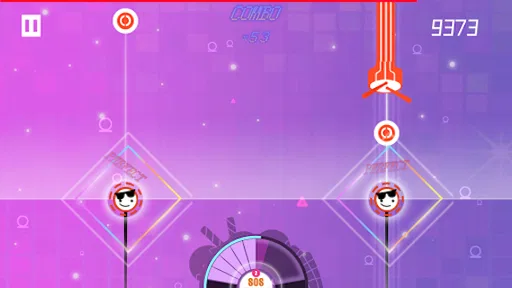
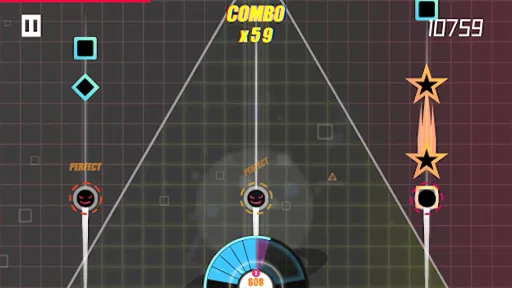
 Analysis by AppCompare
I usually judge a mobile rhythm game by more than its soundtrack: I want to know whether I can read the action quickly, control it comfortably, and enjoy it in the situations where I actually have my phone. Project: Muse is an electronic music game from Rinzz Co. Ltd. that builds its appeal around tapping along to songs, colorful presentation, and a rising challenge. I can see why it has found an audience: it has a focused musical identity, but its fast-moving play also asks something of your eyes, hands, and surroundings.
Reading the screen and finding your way around
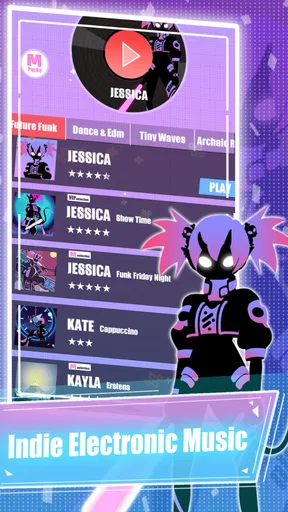
The first impression is bright and busy rather than restrained. That suits an electronic rhythm game, where visual energy can make a track feel more alive, but it also means the screen is part of the challenge. When notes, animation, and background effects compete for attention, I find it helps to focus on the playable cues rather than trying to take in every detail at once. If you prefer calm interfaces or need high visual contrast, the presentation may feel tiring during longer sessions.
Navigation feels approachable enough that I would not expect a newcomer to spend a long time hunting for the basic way into play. That matters because a rhythm game should get you listening and tapping, not make every session feel like a menu puzzle. Still, a tidy first impression is not the same as effortless access for everyone. Small touch targets, animated screens, or text that is hard to distinguish can create friction, so I would suggest trying a short session before committing to a long one.
What the rhythm asks of your hands and ears
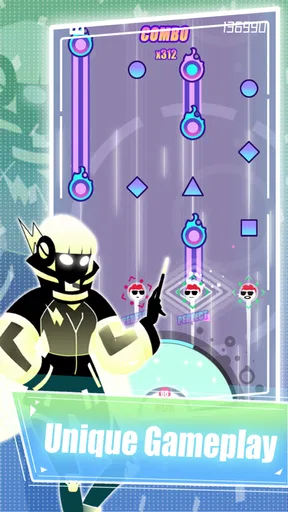
The core appeal is direct: listen, watch, and tap in time. That makes the game easy to understand, but the timing demand becomes less forgiving as the challenge rises. I enjoy that kind of progression when I have a quiet moment and can give the track my attention. If your fingers are tired, you have limited dexterity, or tapping quickly is uncomfortable, the same difficulty curve may turn a relaxing music break into work. I would not treat a missed streak as a personal failing; rhythm games reward repetition, and some sessions simply feel less precise than others.
The music is central, not background decoration. Electronic tracks and vivid motion can make a run feel exciting, yet they can also be a lot of sensory input at once. I would start at a comfortable volume and take a break if the visual effects or pace begin to feel overwhelming. Headphones can help in a noisy place, but they are not always the safest choice when you need to hear people or traffic around you. The best setup is the one that lets you follow the beat without shutting out your surroundings.
When a phone session fits—and when it does not
I can imagine playing while waiting at home for a meal to finish or taking a quiet break between tasks: a short attempt gives me something more engaging than scrolling without requiring a whole evening. For that kind of stop-and-start use, the song-based structure is a natural fit. On a bus or in a crowded waiting room, though, movement and interruptions can make accurate taps harder. I would save harder runs for a stable seat and a moment when I can listen properly, rather than expecting the game to work equally well in every setting.
This is also where it differs from the usual alternatives. A broad playlist app lets you choose music and listen passively; a conventional arcade game may ask for quick reactions but not close attention to a song’s beat. Project: Muse sits between those habits: music is something you actively follow, and timing is part of the play. If you want a rhythm challenge tied to electronic music, that focus is a strength. If you mainly want background listening, a music player is the more comfortable choice; if you want a slower game, a less timing-heavy genre will probably suit you better.
Worth Reading Before You Choose

EA SPORTS FC Mobile 26 Is a Bigger Football Game, but It Takes Time

Flipboard Shows What News Apps Must Do Beyond the Feed

Switching to Android Auto Means Rethinking Your Driving Routine

Google Calendar Makes a Crowded Week Easier to Manage

Ludo King Makes the Most of the Minutes Between Plans

Baby Panda World Brings Quick Play to Modern Phones, but Its Game Library Feels Busy
Small habits that make play more comfortable
One useful approach is to treat a difficult track as practice rather than a score chase. I would replay a section or song with the goal of learning where the rhythm changes, then try for a better result once the pattern feels familiar. That takes pressure off the first attempt and makes improvement easier to notice. It also helps to stop after a few frustrating runs: tired hands and divided attention can make a familiar beat seem harder than it is.
Another practical trade-off is choosing the right place before opening the game. A bright, animated screen is easier to follow when glare is low, and taps are more reliable when the phone is held steadily. If you have trouble with rapid touch input, try a short, easier session first and see whether the timing feels manageable. I would not recommend pushing through discomfort just to keep a streak or beat a friend. The point is to enjoy the music and challenge, not to make your hands or eyes pay for another attempt.
Who is likely to enjoy it
For someone who likes electronic music and enjoys improving through repetition, this has a clear reason to be on the home screen. Its familiar tap-to-the-beat idea is easy to grasp, while the increasing difficulty gives experienced rhythm-game players something to work toward. The colorful style will appeal most to players who enjoy a lively screen rather than understated presentation. At the same time, the game may be less suitable if you need slower input, prefer minimal visual effects, or want music that can simply play while you do something else.
It is free to start, with optional in-app purchases priced from $0.99 to $19.99 per item. I would approach those purchases as optional extras rather than a reason to spend before I know whether the songs and play style suit me. The game is rated for Everyone, has a 4.6 average from around 60,000 ratings, and has passed one million installs. Those figures suggest a substantial audience, but they cannot tell me whether its pace or visual style will feel comfortable for a particular player.
What to know before installing
The game was released on September 30, 2016, and its current version is 9.8.0. It needs Android 6.0 or later. I would check that requirement before installing on an older device, and I would also leave enough free storage for the app and any content it needs. Rhythm games depend on responsive input and clear audio, so a phone that is already struggling with performance may make the experience less enjoyable than it should be.
My main reservation is that a fast, colorful rhythm game cannot be equally comfortable for every player or every context. Difficulty can become demanding, and a busy display may distract people who need simpler visual presentation. I would also avoid assuming that a game designed around tapping is a good fit for someone who cannot comfortably make repeated touch gestures. If that sounds like you, a slower music game or an audio-first listening app may be a better use of your time.
For players deciding whether to try it, the simplest test is a brief session in a quiet, comfortable setting. Notice whether you can pick out the beat, see the cues, and tap without strain. If all three feel good, the rising challenge can make short breaks surprisingly absorbing. If one does not, there is no need to force it: the game’s central appeal depends on that combination, and another music experience may fit your routine better.
Getting into the Groove
So, first things first, downloading Project: Muse was a breeze. Available on both Android and iOS, it doesn’t take up much space, which is a win for those of us constantly battling storage issues. Once installed, you're greeted with a sleek and colorful interface that promises a fun ride. The visuals are vibrant and the animations are smooth, which already sets a high expectation for the gameplay.
Gameplay That Hits the Right Notes
Now, onto the gameplay. If you’ve played rhythm games before, you’ll feel right at home here. The concept is simple yet addictive – tap the screen to the beat of catchy tunes. Sounds easy, right? Well, the difficulty ramps up quickly, and it’s this challenge that keeps you coming back for more.
Each song is represented by a unique character, and there are quite a few to unlock. It’s like collecting Pokémon but for music lovers! Each character has their own style, both in terms of music and aesthetics, adding a nice layer of depth to the game. The tunes are a mix of electronic and pop, and they’re all super catchy. Trust me, you’ll find yourself humming them long after you’ve put your phone down.
Visuals and Design
The design of Project: Muse is another highlight. The developers have done a fantastic job with the graphics. The colors are bright and the animations are fluid, making it a feast for the eyes. Each level is like an explosion of color, which perfectly complements the fast-paced music. It's like being at a digital rave, but without the sore feet!
The user interface is intuitive, so you won’t spend ages trying to figure out what’s what. Everything is laid out nicely, making navigation a breeze. Plus, the game doesn’t bombard you with ads every two seconds, which is a huge plus in my book.
Challenges and Replayability
What really keeps you hooked is the challenge. As you progress, the levels get increasingly difficult, testing your reflexes and timing. It’s frustrating at times, but in a good way. You know, the kind of frustration where you tell yourself "just one more try," and suddenly it’s an hour later.
The game also offers different modes, including a "hard mode" for those who really want a challenge. There are leaderboards to climb, and trust me, nothing feels better than seeing your name at the top. The replayability factor is high, and with frequent updates adding new songs and features, there’s always something fresh to look forward to.
Community and Social Features
One of the standout features is the community aspect. You can connect with friends and challenge them, which adds a competitive edge. Sharing scores and achievements with friends makes the experience more interactive and engaging. It’s always fun to see who’s the best rhythm master among your group.
The developers are pretty active too, often engaging with players and taking feedback seriously. This kind of interaction is always a good sign and shows they care about the player experience.
Final Thoughts
So, what’s the verdict on Project: Muse? It’s a fantastic rhythm game that’s both challenging and entertaining. The combination of addictive gameplay, stunning visuals, and a solid community makes it a must-try for any music game enthusiast. Whether you’re looking to kill a few minutes or dive into a gaming marathon, Project: Muse has got you covered. Give it a shot; you might just find yourself tapping to the beat more often than you’d like to admit!
Pros
- Visually stunning art style.
- Unique rhythm-based gameplay.
- Regular updates with new content.
- Engaging soundtrack with diverse genres.
- User-friendly interface.
Cons
- Some levels can be very challenging.
- In-app purchases can be pricey.
- Occasional ad interruptions.
- Requires internet for certain features.
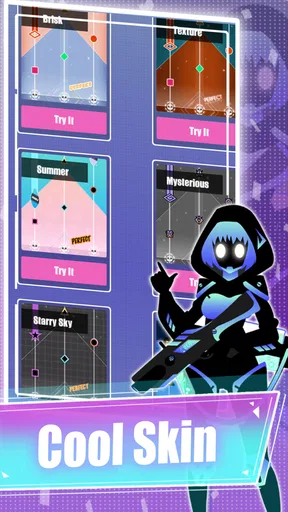
- Limited character customization options.
FAQs for Project: Muse
What is Project: Muse and how does it work?
Project: Muse is a rhythm-based music game available for both Android and iOS devices. Players tap along to the beat of various tracks, aiming to hit notes accurately to score points. The game features a wide range of music genres and offers an immersive visual experience with its dynamic and colorful graphics.
Is Project: Muse free to play?
Yes, Project: Muse is free to download and play. However, it includes in-app purchases that allow players to unlock additional content, such as new songs and characters. While the core gameplay is accessible without spending money, these purchases can enhance the overall experience.
What are the key features of Project: Muse?
Project: Muse boasts several exciting features, including a diverse music library, stunning visual effects, and a variety of difficulty levels to challenge players of all skill levels. The game also offers regular updates with new tracks and events, keeping the gameplay fresh and engaging.
Can I play Project: Muse offline?
Project: Muse requires an internet connection to download new songs and updates. However, once the content is downloaded, you can enjoy playing the game offline. This feature is convenient for users who want to play while on the go without worrying about connectivity issues.
What devices are compatible with Project: Muse?
Project: Muse is available for both Android and iOS platforms. It is compatible with most modern smartphones and tablets. It is recommended to check the specific system requirements on the App Store or Google Play Store to ensure that your device can run the game smoothly.


